It would be helpful to be able scroll the log alphabetically to see if I worked someone when hunting.
A button to switch it back and forth would be a big help.
It would be helpful to be able scroll the log alphabetically to see if I worked someone when hunting.
A button to switch it back and forth would be a big help.
If you enter their callsign in the entry field you will get an check done on dupe status. If it doesn’t warn you of DUPE, then you’re good to go. Saves a lot of time searching.
Alan
Yeah I use that now, and it works great for one callsign.
But, I’m looking at the whole list of CQ’s and trying to quickly see if I worked several names. It would be real quick to scroll through the list alphabetically.
Wayne,
Not sure what list of CQs is. Do you mean spots?
If so, You can tap on a spot to fill in an entry and you will see a dupe if it is.. you can discard the call then if you don’t want to proceed. That’s a much faster way of finding a dupe or a valid qso.
Alan
No I am talking about when I am the activator looking for contacts from people calling cq.
I just want to quickly look and see if I worked them already. Yes I could type them in and see if it says dupe. That works great for a one time check. I want to check multiple people to quickly find one that’s new.
OK Wayne,
you are talking about the SPOTS. There is the QSO List (or QSOs) and the SPOTS (people calling CQ and having been spotted).
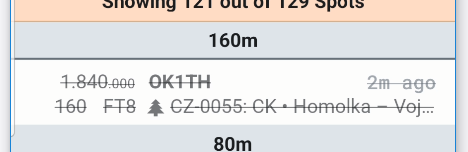
When you log someone from the SPOTS, they will appear as line thru when you return to look again
So that’s very easy to see that you have worked them. If they change bands or modes, then they will appear without the line thru and you can work them again.
If they are new band or mode, but you have logged them before, then their spot appear in green text.
So you are good to go in both those instance to work them again.
Hope this helps
Alan
No I am not talking about the spot list of other activators.
I am talking as an activator looking for other non activator contacts to add to my qso list.
Non-activators are Hunters. They are not listed anywhere. You call CQ to work them.
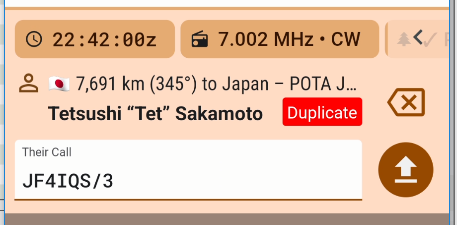
Once they are in the list, a second attempt to log them on the same UTC day, mode or band will show a red sign “Duplicate” like this one.
But there is no list of Hunters you can refer to.
Alan
Wayne,
It might be a good idea to buddy up with an experienced parks activator and see how they do it.
There are possibly thousands of Hunters out there. Some may hear you, some may not. Not all of the ones that hear you will respond to your call for many reasons.,
But there is no “register” of Hunters who are on the air. Certainly no register if those that can hear you. If you think about it, this would be completely unworkable.
Alan
OK, sometimes when no one answers my “CQ POTA” I will answer other people calling CQ. Not activator or hunters. But they all count towards my activation.
But I don’t want to call someone I already worked.
I don’t need a list of hunters, just be able to see if I already worked them.
Maybe this will help, I am talking about digital.
OK then the only way to tell if you have worked them is to enter their callsign and test if a DUPE symbol comes up.. or, of course, remember that you have worked them.
Alan
If you are only talking Digital, then your best way would be to start a new WSJT log for each operation and observe the colors of the stations, Green means you have worked them before (in this log) on the same band and mode. Blue means you have worked them before on a different mode or band.
Check the color scheme in WSJT
Alan
Or scroll through the entries and look.