I cant find any way to export ADI / ADIF files. Any help?
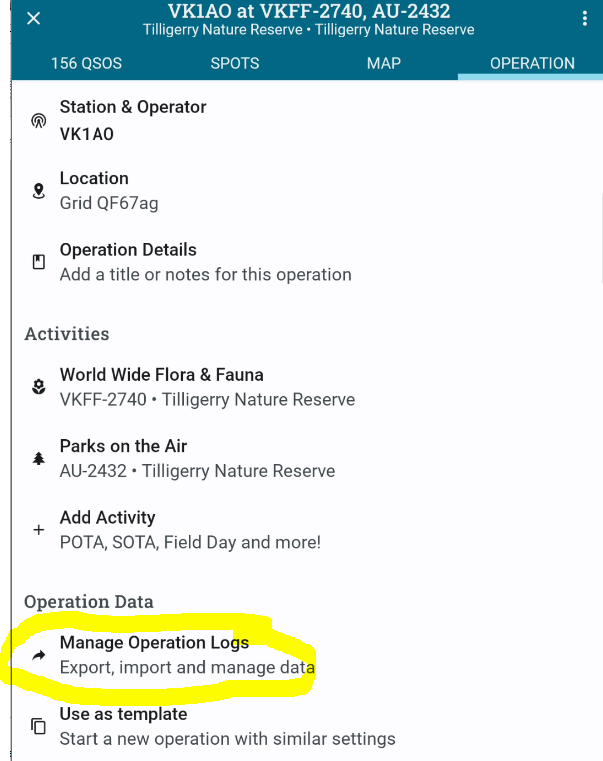
On the Operation Tab tap Manage Operation Logs
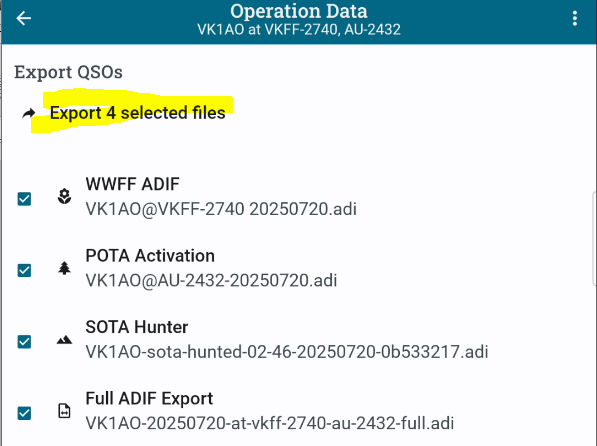
Then select the logs you want and and tap Export
Alan
I dont have op data/ MOL/EI. Is it possible this isnt available in mobile app.
Oh wait, found it.
Sorry I have no idea what you are referring to
Alan
Hi
I see how to export an .adif file OK but I can’t see how to save it to internal storage or to a folder on an SDCard in the Android device?
Dave
PoLo’s framework, which is written around what’s common to both IOS and Android, adheres to the “sharing” api of both operating systems.
Sharing to cloud services such as DropBox, Google Drive or Onedrive is essentially the same thing as sharing to the native filesystem except it’s on steroids., You can still access your export from other applications in these share services but you can also access the exported file from your desktop and they will be in the same recognisable folder structure.
You can also share to an email client if you wish.
But not all File Manager applications expose themselves as a sharing client.
Your best advice is to share to a cloud service and pick it up from the same folder in another application e.g. a web browser.
Alan
If I am doing a remote SOTA activation then I will not have a mobile signal so can’t export to a cloud service.
Dave
Also when running on an Android Tablet the only option is WiFi which is no use for a remote location.
Dave
As soon as you get service you can.
You are not winning anything by saving to the file system when you don’t have service. You already have it on the device in an SQL database. You can export it anytime you like.
In any case, PoLo’s framework is unlikely to change in this regard. It would be too much work to maintain native file management for both Operating Systems.
You may be able to find a FileManager for your device which abides by / offers itself as a sharing client.
Alan
You may also be able to share the export with your email client while offline. It will just stay in your outbox until you are back in service.
I suppose I am assuming that what you are really after is a backup copy somehow as soon as you can do it.
Alan