Would it be possible for PoLo to also log “time off” when the QSO is logged? When I import an adi file to N3FJP, it only shows “time on”, and it would be nice to have both. Thanks!
PoLo is not resting in a state of “QSO ongoing”. There is no start and stop. Only a QSO contact date/time.
Is there not an option in N3JFP to set OFF time to the same as ON? I know other logging apps have this setting.
Alan
e.g. HamRadioDeluxe has this setting and Log4OM has similar..
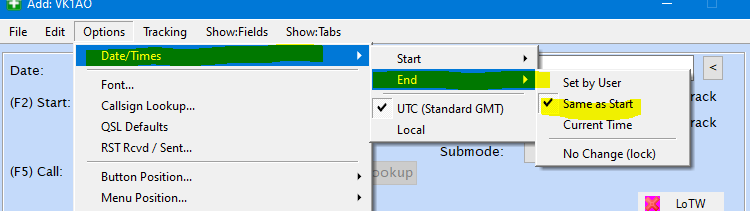
It applies when no TIME_OFF is supplied.
Alan
Hi Alan,
Thanks for the note. While N3FJP does have a similar feature, it only applies when logging from N3FJP and not when importing an adi file. When importing, it takes only what is imported. I hope this helps. Thanks again for your help.
73
Kent
KAØLDG
OK well , PoLo has been running since March 2024 and you are the first to consider this an issue. There must be hundreds of N3JFP users importing logs. I wonder what other users do.
Does the import cause an error message?
Alan
Hello again;
No the import to N3FJP does not cause an error message, it just leaves the “time off” field blank. The reason I’m asking, is I recently uploaded a portion of my logbook to QRZ and it returned with 235 errors related to POTA activations. This is strange as I used to use HAMRS for POTA activations and it too does not log time off. I didn’t have issues from QRZ when uploading those logs…
Here is one of those error messages:
Error 1. Error on record: XXXX de KAOLDG on 2024-12-07 14:07:00. could not be imported into the specified book (). This can happen because the callsign doesnt match or the QSOs date/time is outside of the logbooks date range.
All of the callsigns are valid as well as the dates and times logged, in fact many of those have already been confirmed in LOTW. Perhaps this is just a QRZ thing that’s not worth chasing.
BTW, I like PoLo much better and thank everyone for making it my choice of logging methods while in the field.
Enjoy the weekend!
73
Kent
KA0LDG
OK this is a fairly common error. It comes from 2 things.
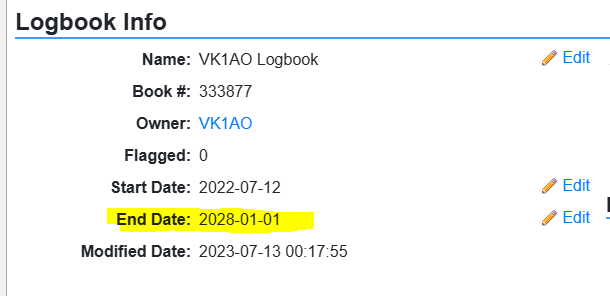
Firstly, the end date of your log. Many of us forget that it has an expiry. Check the end date here in Settings:
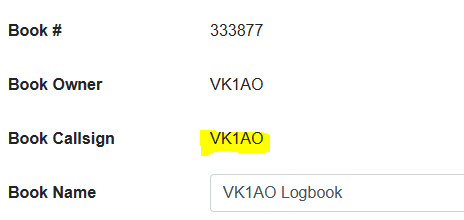
The other reason for the error is a mismatch between the the callsign in your log and one assigned to the log you are importing into. Check the match by clicking on Edit against the logbook Name and make sure your logs match the log operator/station_callsign field values
Alan
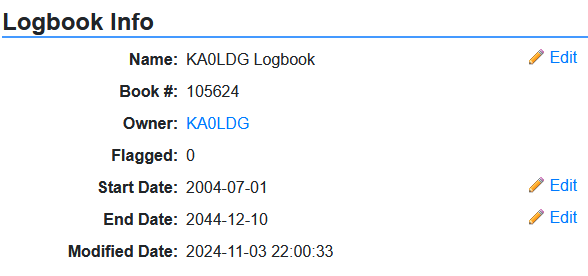
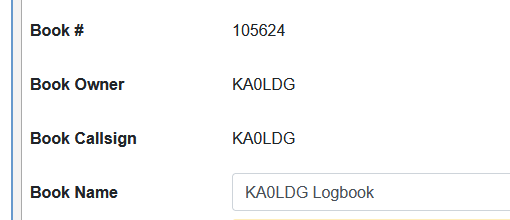
And so what callsign do you have in PoLo? Do they match? or do you have /P or some other mismatch?
Can you drag an ADIF on the next post so we can see it?
Alan
There is no reason the log you just posted will fail to import into QRZ.
But the error message you posted relates to a different QSO and you did not show me this one.
I do notice you may have an alias for /P

And the reason I am curious is that you will not be able to import QSOs for KA0LDG/P into a QRZ log for KA0LDG
Alan
Hi Alan,
Perhaps this is a QRZ issue that needs to figured out by me, as I’m sure you have better things to do with your family, PoLo, getting on the air, etc.
As per your request, ere is the first six error messages I received from QRZ (I couldn’t upload a .txt file).
System Messages:
Error 1. Error on record: K1SN de KAOLDG on 2024-12-07 14:07:00. could not be imported into the specified book (). This can happen because the callsign doesnt match or the QSOs date/time is outside of the logbooks date range.
Error 2. Error on record: AC4BT de KAOLDG on 2024-12-07 14:08:00. could not be imported into the specified book (). This can happen because the callsign doesnt match or the QSOs date/time is outside of the logbooks date range.
Error 3. Error on record: K3SLH de KAOLDG on 2024-12-07 14:10:00. could not be imported into the specified book (). This can happen because the callsign doesnt match or the QSOs date/time is outside of the logbooks date range.
Error 4. Error on record: N4XAT de KAOLDG on 2024-12-07 14:15:00. could not be imported into the specified book (). This can happen because the callsign doesnt match or the QSOs date/time is outside of the logbooks date range.
Error 5. Error on record: W5KEB de KAOLDG on 2024-12-07 14:17:00. could not be imported into the specified book (). This can happen because the callsign doesnt match or the QSOs date/time is outside of the logbooks date range.
Here is the ADI file containing the first 136 Qs that were rejected.
KA0LDG@US-5748-20241207.adi (51.0 KB)
I don’t ever remember using KA0LDG/P for anything, so that shouldn’t be an issue.
Once again, thanks for all your help, and maybe we should end this discussion since it appears to be a QRZ issue.
73
Kent
KA0LDG
WRT this ADIF file you just posted.
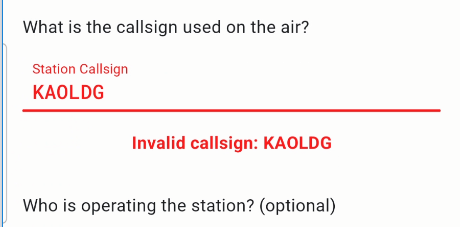
The Operator is KAOLDG and not KA0LDG
i.e you have entered O for the letter Oscar and not 0 for zero and that’s for the whole column.The file name is correct with 0 for zero
That will never work for you
Alan
Alan, you are a great help!!! Thank you, thank you, thank you!!! The old “O” vs “0” caught me again..grrrr. Once again, thank you for taking your time and sleuthing out the problem! If you’re’ ever in North Dakota, I owe you a beer or two ;-).
73
Kent
KA0LDG
I need a park in ND. Let me know when you’re on the key in park!
Alan
Hi Alan,
I’ll be out on Saturday, 2 Nov, at a ND park. It’s ND POTA Day, so a bunch of us will be activating parks. I plan to be on 20 if I can find a spot in between the Sweepstakes signals. If 20 doesn’t work, I’ll try 17m and perhaps 15, 12, or 10. Check the POTA spotting site as I’ll self spot. If conditions are in our favor, perhaps we can work a Q.
73
Kent
KAØLDG
1 Like
You’re in my HamAlert